Key concepts
This page presents the notions Bemba is built on. Each section points to the detailed page of the guide.
The main path

- Collection: field surveys arrive from KoboToolbox or Survey Solutions.
- Registry: each household enters the unified social registry (RSU) with a unique identifier.
- Targeting: the PMT score and each program's rules determine eligibility.
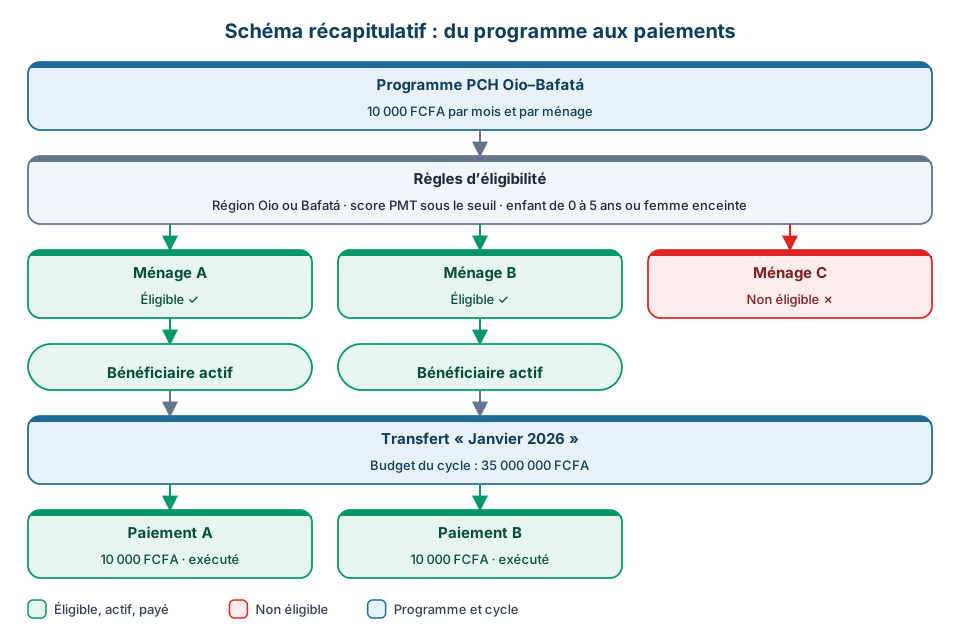
- Enrolment: an eligible household becomes a beneficiary of a program.
- Transfers: payments are generated, validated, exported to the operator, then reconciled.
- Follow-up: complaints, monitoring and evaluation, and reports support the whole.
Institution, project and scope
Each user is attached to an institution and to one or more projects. This attachment defines their scope: they only see the households, programs, transfers and complaints of their projects. Seeing the whole registry is a right granted explicitly. A user with no attachment sees no data.
An archived project remains viewable: it appears in filters with the "(Archived)" mention, but no longer in data-entry forms.
Household and social registry
The household is the unit of the registry: people living under the same roof and sharing meals. Its record brings together the head of household, the members, the dwelling and the location.
The unified social registry gathers the households of all projects. A household collected twice is flagged in Duplicate Management. See Household list and RSU.
PMT score and eligibility
The Proxy Means Test (PMT) estimates a household's living standard from observable characteristics: composition, dwelling, assets. A low score means a poorer household. The score places the household in a category: Extreme, Severe, Moderate, Vulnerable or Non-poor.
Each program applies its own rules. A household can therefore be eligible for one program and not for another. See PMT score and Eligibility rules.
Program
A program sets the frame of a transfer: project, donor, areas, amounts, conditionalities and eligibility rules. See Programs.

Beneficiary
A beneficiary is a household enrolled in a program. It has a payment method: a mobile money account or a bank account.

Over the program, it moves through the active, suspended, under recertification, graduated or exited states. See Beneficiary list.

Transfer and payment
A transfer is a payment period of a program. It contains one payment per beneficiary.
A payment goes through a double validation, first by the RAF then by the coordinator, before it is sent to the operator. A completed payment has the Executed status. The file sent to the operator (ST) and the return file (CT) are used for reconciliation. See Transfers.

Cash transfers used to be called "cycles". The word "cycle" is still used for caregiver payments.
Geographic hierarchy

A household is attached to a region, a sector and a locality (tabanca). The Geography group manages regions, sectors and localities, as well as infrastructure. See Geographic reference data.
Complaints
The grievance redress mechanism (GRM) records and tracks complaints: phase-based workflow, deadlines and escalation, sensitive complaints handled separately. Complaints can also be handled without a network, except sensitive ones. See Complaints.
Roles and permissions
Each user has a role. A role is a set of permissions, each tied to an action on a screen and named in plain words in Settings → Roles, for example viewing households or generating reports. The menu only shows the screens allowed.
DLI indicators and IFR reports
Disbursement-linked indicators (DLI) condition World Bank disbursements. Interim financial reports (IFR) account for financial execution. Both are found under Reports. See DLI indicators and IFR reports.