Welcome to Bemba
Bemba is the management information system (GIS) of the Human Capital Project (PCH) in Guinea-Bissau. It covers data collection, the social registry, targeting, cash transfers, complaints, monitoring and evaluation, and mapping.
The Human Capital Project (P179509)
The PCH is a USD 20 million project financed by the International Development Association (IDA) of the World Bank, approved in January 2025. Its objective is to strengthen service delivery in the social sectors to improve human capital outcomes.
Context
- Human Capital Index: 0.30: a child born today will reach only 30% of their potential productivity.
- 43.7% of the population lives below the poverty line.
- 36% stunting among children in the Oio region, the highest rate in the country.
- 33% of children aged 6 to 11 have never been to school.
- The primary completion rate is only 27%.
Project components
| Component | Description | Budget |
|---|---|---|
| 1. Investing in women and children | Cash transfers, national social registry, integrated social services (0-10 years) | USD 6.74 M |
| 2. Improving service delivery | Performance-based financing in health and education, digital tools | USD 5.65 M |
| 3. Management and coordination | Institutional strengthening, monitoring and evaluation, inter-ministerial coordination | USD 7.61 M |
Priority intervention areas
Activities start in the Oio and Bafatá regions, which have the most poor households, the weakest human capital outcomes and the highest climate vulnerability.
Direct beneficiaries
| Category | Number |
|---|---|
| Vulnerable households (cash transfers) | 3,500 |
| Primary school pupils | 111,000 |
| Pregnant women and adolescents | 200,000+ |
| Children under 5 | 1,000,000+ |
Institutional partners
- Ministry of Public Health: health component
- Ministry of Education: education component
- Ministry of Women, Family and Social Solidarity: social protection and registry
Bemba modules
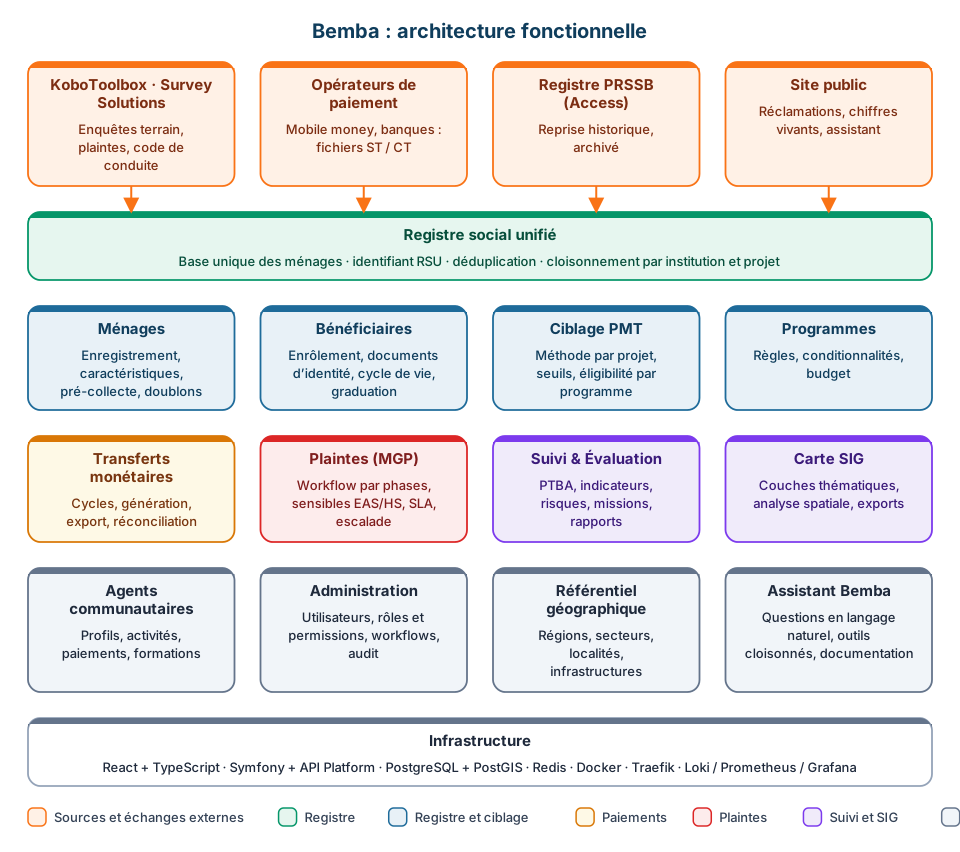
The modules follow the groups of the side menu (see Interface).
Data Collection
- Data Collection: collected households and enumerators, imported from KoboToolbox and Survey Solutions. Enumerators are created automatically on import.
- Data Quality: completeness, anomalies and checks.
Social Registry
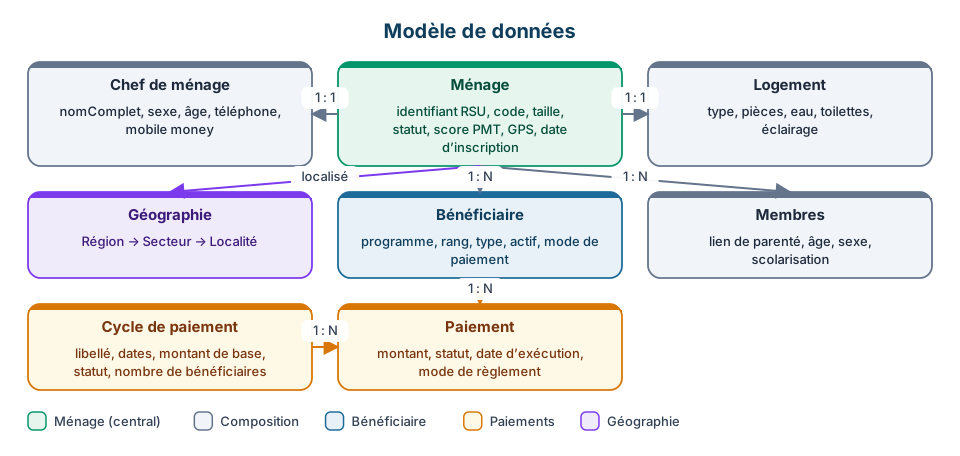
- Households: unified social registry, full household record, members, dwelling, PMT score.
- Duplicate Management: finding and merging households registered twice.
- Documents & Accounts: identity documents and payment accounts.
- Eligibility: rules per program, household assessment, enrolment.
Cash Transfers
- Programs and Beneficiaries: the frame of transfers and the enrolled households.
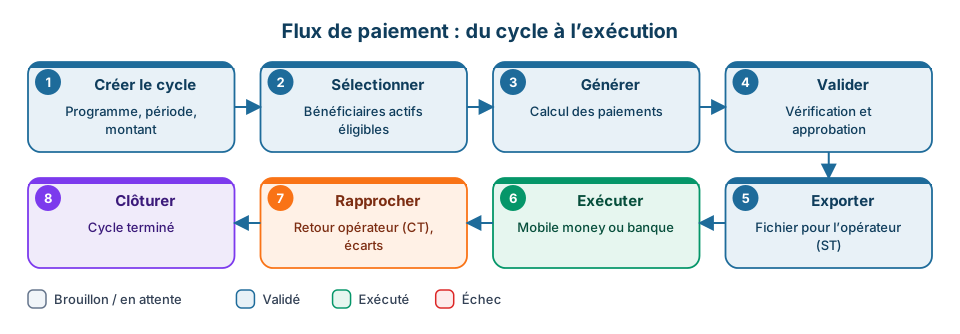
- Transfers and Payments: generation, double validation, export to the operator.
- Recurrence: transfers scheduled at regular intervals.
- Reconciliation: matching against the operator's return file.
- Operator Accounts: mobile money and bank accounts.
- SMS Campaigns: personalised SMS files to hand to the operator.
Social Services
- GBV Services: support services for gender-based violence.
- Code of conduct: signed commitments collected through KoboToolbox.
M&E
- M&E PTBA: work plan activities, results framework, risks, missions and reports.
- Support, Coverage, Climate.
Caregivers
Registry, training and payments of community caregivers.
Complaints (GRM)
- Recording, phase-based workflow, deadlines and escalation.
- Sensitive complaints handled separately and never copied offline.
- Import from KoboToolbox and Survey Solutions, knowledge base.
- Offline complaint handling (see Offline mode).
Reports
- Reports: dashboards by theme, insights, DLI indicators, exports.
- Analytics: customisable widgets.
- Government Reports: quarterly and annual reports, interim financial reports (IFR).
- GIS Map: globe and detailed map with layers, filters and spatial analyses.
Geography
Regions, sectors, localities and infrastructure: schools, health centers, water points, police stations.
Meetings & Attendance, Communication
Meetings with attendance sheets, a contact directory, public website news.
Administration
Settings, projects, institutions, public website, donors, website content (CMS), knowledge base and audit log.
Cross-cutting features
- Bemba AI assistant: answers questions about the data within your scope, in French, Portuguese, English or Creole. On the public website, a version with no data access presents the project and helps submit a complaint. See Bemba AI.
- Notifications: the bell in the top bar and the Notifications page.
- Help button: on several screens, opens the matching page of this guide.
- Languages: interface in French, Portuguese and English.
- Public website: project presentation, news, newsletter, complaint form. See Public website.
Functional architecture
Data model
Payment flow
Who sees what
Each user is attached to an institution and to one or more projects. They only see the data of those projects. Seeing the whole registry is a right granted explicitly; without an attachment, no data is visible.
What a user can do depends on their role. The roles in use:
| Role | Area |
|---|---|
| Administrateur Système | Full access, users and settings |
| Coordinateur National | Project coordination, final validations |
| Coordinateur Éducation | Education strand |
| Coordinateur Santé | Health strand |
| Spécialiste M&E | Monitoring and evaluation, indicators, reports |
| RAF / Comptable | Administrative and financial management, payment validation |
| SSE | Environmental safeguards specialist |
| SSS | Social safeguards specialist, complaints |
| Spécialiste Transferts Monétaires | Programs, transfers and payments |
| TTL PS | World Bank task team leader for social protection |
The administrator adjusts each role's permissions in Settings → Roles.
First steps
- Log in to the application.
- Get familiar with the interface.
- Read the key concepts.
The Tutorials section offers step-by-step guides.