Bemba Administration Guide
This guide is for the system administrators who install, deploy, back up and monitor Bemba, the management information system of the Projeto Capital Humano.
Overview
| Component | Technology | Role |
|---|---|---|
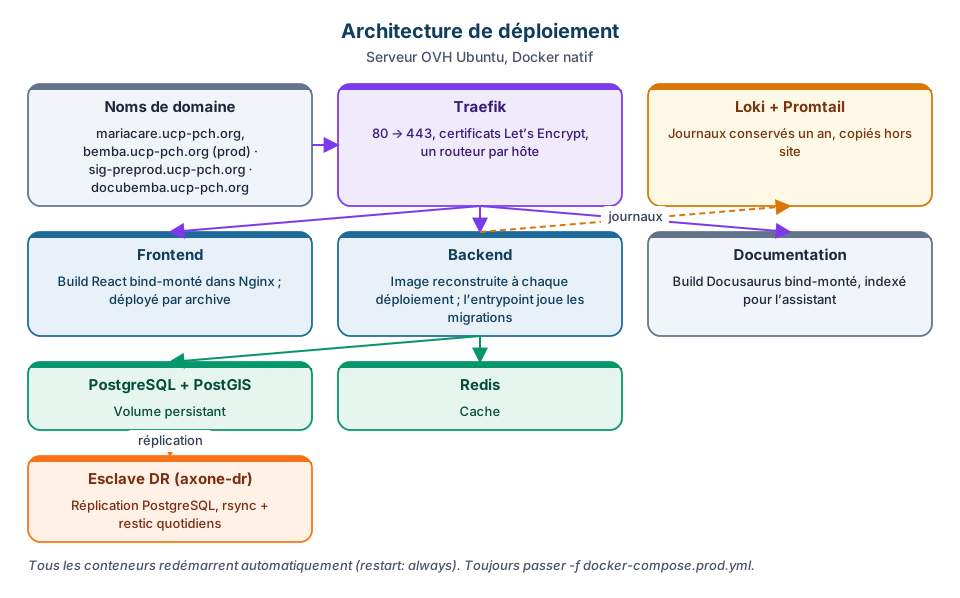
| Frontend | React 18 + TypeScript, served by Nginx | Application (SPA) and public website |
| Backend | Symfony 7 + PHP 8.3 (PHP-FPM + Nginx in the same container) | REST API, asynchronous jobs (Messenger), scheduler |
| Database | PostgreSQL 15 + PostGIS 3.4 | Business and geographic data |
| Cache | Redis 7 | Application cache, rate limiting |
| Reverse proxy | Traefik 2.10 | HTTPS (Let's Encrypt) and host-based routing |
| Documentation | Docusaurus, served by Nginx | This site (docubemba.ucp-pch.org) |
| Logs | Loki + Promtail | One-year log retention |
Servers
| Server | Address | Role | Host names |
|---|---|---|---|
| Production | 51.75.79.112 (OVH VPS, Ubuntu) | main branch | bemba.ucp-pch.org, mariacare.ucp-pch.org, ucp-pch.org, docubemba.ucp-pch.org |
| Pre-production | 51.75.77.220 (OVH VPS, Ubuntu) | staging branch, testing | sig-preprod.ucp-pch.org, KoboToolbox (kf/kc/ee.kobo.ucp-pch.org), Survey Solutions, GitLab (gitlab.ucp-pch.org) |
| Disaster recovery (DR) | axone-dr replica host | PostgreSQL replica of production and encrypted copies (restic) | — |
Both servers run native Docker (no intermediate virtual machine). The project lives in ~/pch-sig.
Always pass
-f to docker composedocker compose loads compose.yaml before docker-compose.yml. Run without -f from ~/pch-sig, it starts the Symfony skeleton (a database with the default password) instead of the application. Always:
docker compose -f docker-compose.prod.yml …      # production
docker compose -f docker-compose.preprod.yml …   # pre-production
Production containers
| Container | Image | Role |
|---|---|---|
pch_traefik | traefik:v2.10 | Ports 80/443, certificates, redirects |
pch_frontend | nginx:alpine | React build (bind-mounted from frontend/build) |
pch_backend | built image (backend/Dockerfile.prod) | PHP-FPM + Nginx + Messenger workers (supervisord) |
pch_postgres | postgis/postgis:15-3.4-alpine | pch_sig database |
pch_redis | redis:7-alpine | Cache |
pch_documentation | nginx:alpine | Documentation site |
pch_loki, pch_promtail | grafana/loki, grafana/promtail 2.9 | Log collection and retention |
pch_cadvisor, pch_node_exporter, pch_postgres_exporter, pch_redis_exporter | Prometheus exporters | Metrics, ports bound to 127.0.0.1 |
pch_pg_dr_proxy | socat (outside compose) | DR host access to PostgreSQL for replication |
smtp_relay | boky/postfix (~/smtp-relay) | SMTP relay reserved for the 220 server (KoboToolbox) |
Access
Servers are reached over SSH with a key (user ubuntu). Credentials (application accounts, database, API keys) never appear in the documentation: they are kept in the secrets manager. The secrets inventory and rotation are described in docs/ROTATION_SECRETS.md in the repository.
Sections of this guide
- Tech stack and architecture
- Local development, conventions, environments
- Installation: prerequisites, Docker, configuration, first start
- Operations: deployment, automatic start, updates, self-hosted KoboToolbox
- Maintenance: backup, restore, monitoring, logs, troubleshooting
- Security: JWT authentication, HTTPS, best practices