USR - Unified Social Registry
The Unified Social Registry (USR) is the national registry of vulnerable households. It belongs to the country, not to the institutions that feed it: each institution collects for its projects, but once validated, the data enter a common registry where each household has a unique and stable identity.
Overview
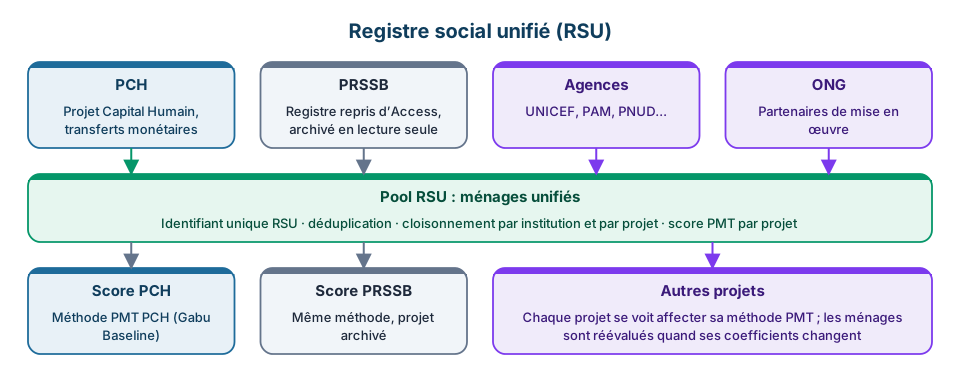
The model
Institution ──► Projects ──► Programs ──► Beneficiaries
                   │
                   └── collection (Kobo, Survey Solutions, file)
                              │
                              ▼
                        Pre-collection ──► validation ──► REGISTRY (USR)
| Concept | Description |
|---|---|
| Institution | Ministry, agency, NGO, donor, project... Each institution carries one or more projects |
| Project | Collection and funding framework. A project configures its own collection tool |
| Program | A project's scheme, with its eligibility criteria |
| Beneficiary | Eligible household, selected by a program |
| Registry | All households that entered the USR, across institutions |
The USR identifier
Each household entering the registry receives a USR identifier: twelve randomly drawn digits with no meaning, the last of which is a check digit (Verhoeff). It is displayed in groups of four:
2001 2046 0973
This format follows India's Aadhaar, and each of its choices answers a known failure mode:
| Choice | Why |
|---|---|
| No meaning | An identifier that encodes a date, a sex or a place discloses them, and becomes wrong the day the attribute is corrected |
| Random draw | A counter reveals enrolment order and volume |
| Verhoeff check digit | Catches any single-digit error and any swap of adjacent digits, the failure mode of a number read out over the phone |
| Digits only | Numeric keypad, USSD, SMS; no confusion between O and 0 |
The USR identifier is the household's identity in the registry. The household code (ACC-12435, PRSSB-4471...) is only a collection code, specific to the numbering of the project that entered it. Both coexist; the USR identifier is what lists display and what search looks for.
Entering the registry
A household enters the registry from the collection screen, once its collection is validated:
- Collection: import from Kobo, Survey Solutions or a file, with the project's account
- Validation: data check on the pre-collection screen
- Integration: match check, then assignment of the USR identifier
See Integrating households and Pre-collection workflow.
Once in, the household is marked In the registry, which the USR registry filter of the household list lets you find.
Who sees what
| User | Sees |
|---|---|
| Administrator | Everything |
| USR privilege (granted on request) | All households in the registry, whichever institution collected them |
| Attached to an institution and projects | Households, programs, beneficiaries, payments and complaints within their scope: what their institution collected, plus what takes part in their projects |
| No institution and no privilege | Nothing |
The USR privilege is set on the user's record (National registry access). Seeing the whole registry is a decision, never the absence of an attachment.
PMT score per project
The PMT score belongs to the project: each project has its PMT method, managed in Settings > PMT methods. A household is scored with the method of the project it is selected in; a household with no project, or whose project has no method, has no score. There is no national method.
A program can have its own method, which recomputes the score for its evaluation only. A grid-type method cannot be assigned to a project.
A low score means a poorer household. The score feeds each program's eligibility, which may add its own rules: the PMT measures the household, eligibility is the program's decision. See the PMT score methodology.
Access
- Households: the registry list, with the USR identifier, search by identifier and the USR registry filter
- Data Collection > Households tab: pre-collection, where households are validated then integrated
- Institutions: institutions and their data sharing agreements (administrators)
Permissions
| Action | Permission |
|---|---|
| View the registry | View households |
| Validate a collection and integrate it into the registry | Validate households |
| Reject a collection | Reject households |
| Grant access to the whole registry | Administrator, on the user's record |
| Manage institutions and sharing agreements | Administrator |